> For the complete documentation index, see [llms.txt](https://developerdocs.instructure.com/llms.txt). Markdown versions of documentation pages are available by appending `.md` to page URLs; this page is available as [Markdown](https://developerdocs.instructure.com/services/canvas/external-tools/lti/file.pns.md).
# Platform Notification Service
Platform Notification Service (PNS) enables server-to-server communication by allowing the Platform to send messages, known as Notices, to Tools outside the scope of an active user session. Tools can register a "webhook" or handler endpoint using PNS to receive specific types of Notices, facilitating seamless integration and automation.
See also [endpoint-level documentation](/services/canvas/resources/notice_handlers.md) and [Official (1EdTech) documentation](https://www.imsglobal.org/spec/lti-pns/v1p0/main).
## Tool Configuration
Make sure the tool has the required `https://purl.imsglobal.org/spec/lti/scope/noticehandlers` scope.
### Dynamic Registration
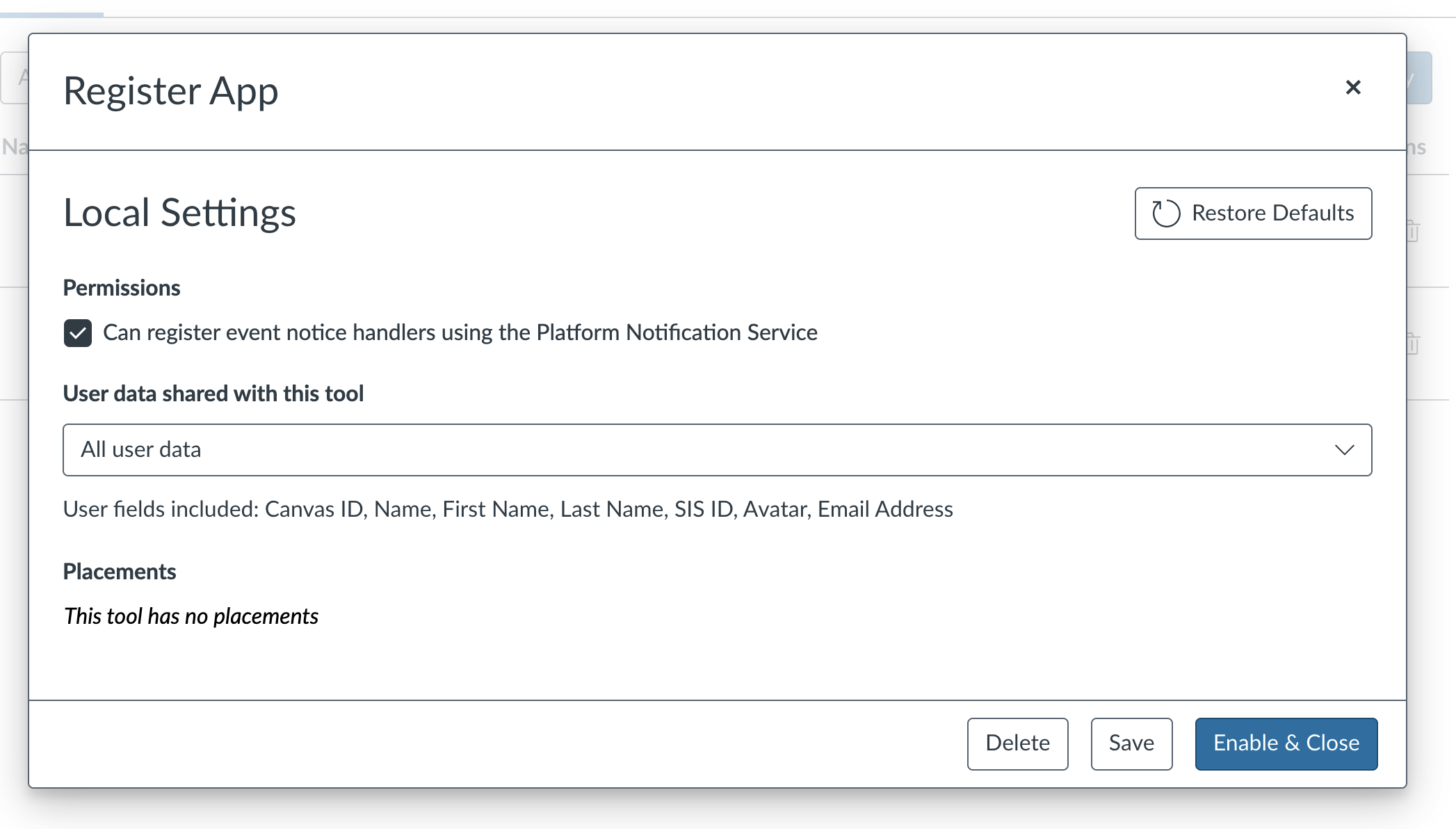 ### Manual Registration
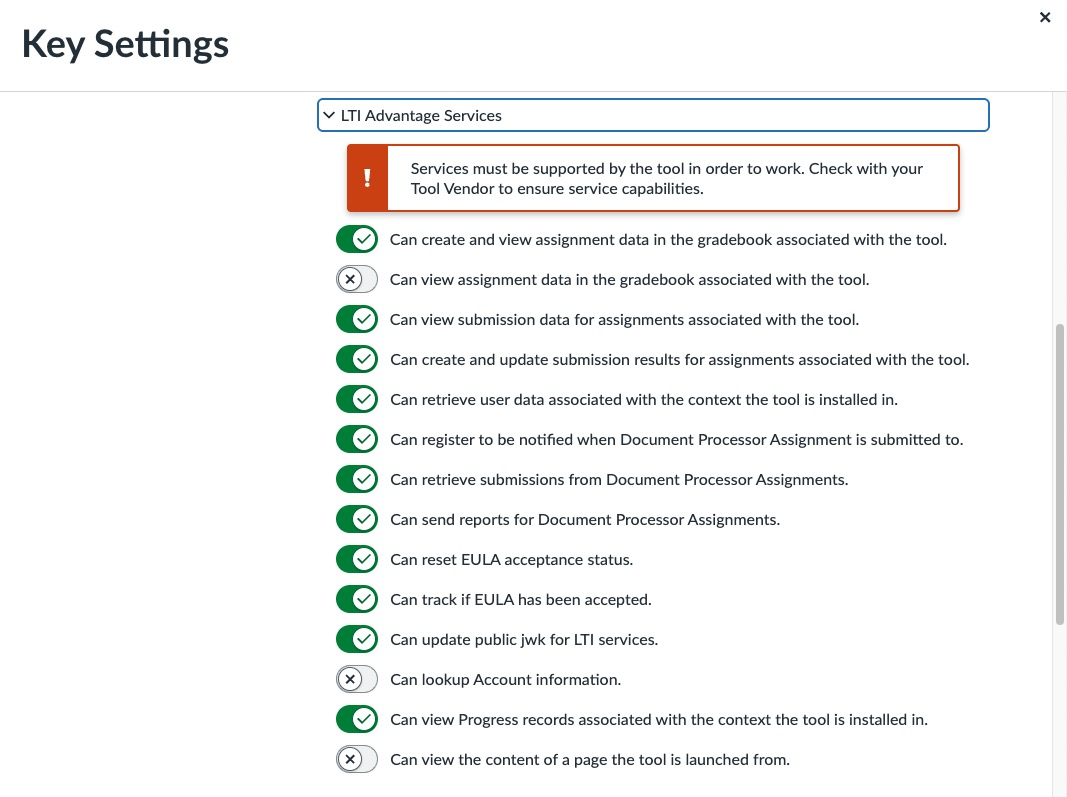 ## Registering Notice Handlers
To register a Notice Handler (webhook), the tool has to call the platform notification service endpoint. The endpoint URL is advertised in every LTI launch in the `https://purl.imsglobal.org/spec/lti/claim/platformnotificationservice` claim:
```json
...
"https://purl.imsglobal.org/spec/lti/claim/platformnotificationservice": {
"service_versions": [
"1.0"
],
"platform_notification_service_url": "http://canvas-web.inseng.test/api/lti/notice-handlers/106",
"scope": [
"https://purl.imsglobal.org/spec/lti/scope/noticehandlers"
],
"notice_types_supported": [
"LtiHelloWorldNotice",
"LtiAssetProcessorSubmissionNotice",
"LtiContextCopyNotice"
]
},
...
```
### Register the notice handler:
```http
PUT http://canvas-web.inseng.test/api/lti/notice-handlers/106
Content-Type: application/json
Authorization: Bearer
{
"notice_type": "LtiContextCopyNotice",
"handler": "http://lti-13-test-tool.inseng.test/notice_handlers/106:8865aa05b4b79b64a91a86042e43af5ea8ae79eb"
}
```
Response:
```json
{
"notice_type": "LtiContextCopyNotice",
"handler": "http://lti-13-test-tool.inseng.test/notice_handlers/106:8865aa05b4b79b64a91a86042e43af5ea8ae79eb"
}
```
### Get registered notice handlers:
```http
GET http://canvas-web.inseng.test/api/lti/notice-handlers/106
Content-Type: application/json
Authorization: Bearer
```
Response:
```json
{
"client_id": 10000000000068,
"deployment_id": "106:8865aa05b4b79b64a91a86042e43af5ea8ae79eb",
"notice_handlers": [
{
"notice_type": "LtiContextCopyNotice",
"handler": "http://lti-13-test-tool.inseng.test/notice_handlers/106:8865aa05b4b79b64a91a86042e43af5ea8ae79eb"
},
{
"notice_type": "LtiHelloWorldNotice",
"handler": ""
}
]
}
```
### Notes:
* Use [LTI Advantage token](/services/canvas/oauth2/file.oauth.md#accessing-lti-advantage-services-link) for authentication.
* You can have only one notice handler for a given notice type.
* You can remove the notice handler by setting `""` as a handler.
* Notice handler endpoint must be public, without any authentication.
* Notice handler domain must match the domain of the tool.
* Canvas does not retry delivery of a notice if the notice handler is unavailable.
## Receiving Notices
Canvas sends notices with POST to the registered handlers. The body contains an array of notices. Every notice is a signed JWT. Example body:
```json
{
"notices": [
{
"jwt": "eyJ0eXAiOiJKV1QiLCJhbGciOiJSUzI1NiIsImtpZCI6IjIwMjUtMDItMDFUMDE6MTY6NDNaXzMwMTg2ODVkLTA1YjctNDNjYi1iODY1LTAyN2VlYzM1MjcxNCJ9.eyJodHRwczovL3B1cmwuaW1zZ2xvYmFsLm9yZy9zcGVjL2x0aS9jbGFpbS92ZXJzaW9uIjoiMS4zLjAiLCJodHRwczovL3B1cmwuaW1zZ2xvYmFsLm9yZy9zcGVjL2x0aS9jbGFpbS9ub3RpY2UiOnsiaWQiOiIxMjU4ZTg1MC04NDQ2LTQzYmYtOTQ2MC1kMjQ5YTYwMDA5MDQiLCJ0aW1lc3RhbXAiOiIyMDI1LTAzLTE5VDExOjExOjE3WiIsInR5cGUiOiJMdGlIZWxsb1dvcmxkTm90aWNlIn0sImF1ZCI6IjEwMDAwMDAwMDAwMDY4IiwiYXpwIjoiMTAwMDAwMDAwMDAwNjgiLCJodHRwczovL3B1cmwuaW1zZ2xvYmFsLm9yZy9zcGVjL2x0aS9jbGFpbS9kZXBsb3ltZW50X2lkIjoiMTA2Ojg4NjVhYTA1YjRiNzliNjRhOTFhODYwNDJlNDNhZjVlYThhZTc5ZWIiLCJleHAiOjE3NDIzODYyNzcsImlhdCI6MTc0MjM4MjY3NywiaXNzIjoiaHR0cHM6Ly9jYW52YXMuaW5zdHJ1Y3R1cmUuY29tIiwibm9uY2UiOiJiZDc1ODcxNS1lODMzLTRkZGQtOGQ4NS1mYjlhNTE1YzViZjAiLCJodHRwczovL3B1cmwuaW1zZ2xvYmFsLm9yZy9zcGVjL2x0aS9jbGFpbS9jb250ZXh0Ijp7ImlkIjoiODg2NWFhMDViNGI3OWI2NGE5MWE4NjA0MmU0M2FmNWVhOGFlNzllYiIsInRpdGxlIjoiRmFrZSBBY2FkZW15IiwidHlwZSI6WyJBY2NvdW50Il19LCJodHRwczovL3d3dy5pbnN0cnVjdHVyZS5jb20vaGVsbG9fd29ybGQiOnsidGl0bGUiOiJIZWxsbyBXb3JsZCEiLCJtZXNzYWdlIjoiQ29uZ3JhdHVsYXRpb25zISBZb3UgaGF2ZSBzdWNjZXNzZnVsbHkgc3Vic2NyaWJlZCB0byBMdGlIZWxsb1dvcmxkTm90aWNlIGluIENhbnZhcy4ifX0.Qi3_cSpe_3emC1fFMhJwOMLsMcBxEDkU5R0KtD5GAs_o3fWCT9CJ1ouyt_sO0XOrYczSpA2Y7RLnfi6ey7HI7Gf28lbvONwsbh-I-PWDkxmlVhchnnHJeDn3Z5hJMe1KlJzbXMI2Ee1LaYQkXbEe0wWJGMbnVKYm_YOVRe0sD0g18iDgSXBlAFCTQxAxuzjNAkMQXtc3KroMAaoj8kEu4yDGvGot0mUs-CBcDCFAx2_AOMczBqQ5HXmgExv8qYBYl89Q1KyyqIPt0jbQqmkwZgLayOxuDJ6_Viqsy78Iywabxk__XZsNvbTB4IeSYReiwGs4MFMbWUgol_h4hRwg6A"
}
]
}
```
### LtiContextCopyNotice
LtiContextCopyNotice is sent to registered notice handlers when course content is imported to a new or existing course.
Example notice content:
```json
{
"https://purl.imsglobal.org/spec/lti/claim/version": "1.3.0",
"https://purl.imsglobal.org/spec/lti/claim/notice": {
"id": "7a70e604-5b2e-4013-b628-4806228999f1",
"timestamp": "2025-03-19T11:24:25Z",
"type": "LtiContextCopyNotice"
},
"aud": "10000000000068",
"azp": "10000000000068",
"https://purl.imsglobal.org/spec/lti/claim/deployment_id": "106:8865aa05b4b79b64a91a86042e43af5ea8ae79eb",
"exp": 1742387069,
"iat": 1742383469,
"iss": "https://canvas.instructure.com",
"nonce": "2d220edf-2f1c-4be4-b38e-ec80b1c6749d",
"https://purl.imsglobal.org/spec/lti/claim/context": {
"id": "4dde05e8ca1973bcca9bffc13e1548820eee93a3",
"label": "zzz",
"title": "zzz",
"type": [
"http://purl.imsglobal.org/vocab/lis/v2/course#CourseOffering"
]
},
"https://purl.imsglobal.org/spec/lti/claim/origin_contexts": [
"5098686ffc86cae4e0784b533a18af229ff5074e"
]
}
```
#### Claims
`context`: metadata about the new LTI Context (Course)
`origin_contexts`: array with 1 element: LTI Context id of the source course
***
This documentation is generated directly from the Canvas LMS source code, available [on Github](https://github.com/instructure/canvas-lms).
---
# Agent Instructions
This documentation is published with GitBook. GitBook is the documentation platform designed so that both humans and AI agents can read, navigate, and reason over technical content effectively. Learn more at gitbook.com.
## Querying This Documentation
If you need additional information that is not directly available in this page, you can query the documentation dynamically by asking a question.
Perform an HTTP GET request on the current page URL with the `ask` query parameter, and the optional `goal` query parameter:
```
GET https://developerdocs.instructure.com/services/canvas/external-tools/lti/file.pns.md?ask=&goal=
```
`ask` is the immediate question: it should be specific, self-contained, and written in natural language.
`goal` is optional and describes the broader end goal you are ultimately trying to accomplish on behalf of the user. GitBook uses it to tailor the answer towards what is most useful for that goal.
The response will contain a direct answer to the question and relevant excerpts and sources from the documentation.
Use this mechanism when the answer is not explicitly present in the current page, you need clarification or additional context, or you want to retrieve related documentation sections.
## Registering Notice Handlers
To register a Notice Handler (webhook), the tool has to call the platform notification service endpoint. The endpoint URL is advertised in every LTI launch in the `https://purl.imsglobal.org/spec/lti/claim/platformnotificationservice` claim:
```json
...
"https://purl.imsglobal.org/spec/lti/claim/platformnotificationservice": {
"service_versions": [
"1.0"
],
"platform_notification_service_url": "http://canvas-web.inseng.test/api/lti/notice-handlers/106",
"scope": [
"https://purl.imsglobal.org/spec/lti/scope/noticehandlers"
],
"notice_types_supported": [
"LtiHelloWorldNotice",
"LtiAssetProcessorSubmissionNotice",
"LtiContextCopyNotice"
]
},
...
```
### Register the notice handler:
```http
PUT http://canvas-web.inseng.test/api/lti/notice-handlers/106
Content-Type: application/json
Authorization: Bearer
{
"notice_type": "LtiContextCopyNotice",
"handler": "http://lti-13-test-tool.inseng.test/notice_handlers/106:8865aa05b4b79b64a91a86042e43af5ea8ae79eb"
}
```
Response:
```json
{
"notice_type": "LtiContextCopyNotice",
"handler": "http://lti-13-test-tool.inseng.test/notice_handlers/106:8865aa05b4b79b64a91a86042e43af5ea8ae79eb"
}
```
### Get registered notice handlers:
```http
GET http://canvas-web.inseng.test/api/lti/notice-handlers/106
Content-Type: application/json
Authorization: Bearer
```
Response:
```json
{
"client_id": 10000000000068,
"deployment_id": "106:8865aa05b4b79b64a91a86042e43af5ea8ae79eb",
"notice_handlers": [
{
"notice_type": "LtiContextCopyNotice",
"handler": "http://lti-13-test-tool.inseng.test/notice_handlers/106:8865aa05b4b79b64a91a86042e43af5ea8ae79eb"
},
{
"notice_type": "LtiHelloWorldNotice",
"handler": ""
}
]
}
```
### Notes:
* Use [LTI Advantage token](/services/canvas/oauth2/file.oauth.md#accessing-lti-advantage-services-link) for authentication.
* You can have only one notice handler for a given notice type.
* You can remove the notice handler by setting `""` as a handler.
* Notice handler endpoint must be public, without any authentication.
* Notice handler domain must match the domain of the tool.
* Canvas does not retry delivery of a notice if the notice handler is unavailable.
## Receiving Notices
Canvas sends notices with POST to the registered handlers. The body contains an array of notices. Every notice is a signed JWT. Example body:
```json
{
"notices": [
{
"jwt": "eyJ0eXAiOiJKV1QiLCJhbGciOiJSUzI1NiIsImtpZCI6IjIwMjUtMDItMDFUMDE6MTY6NDNaXzMwMTg2ODVkLTA1YjctNDNjYi1iODY1LTAyN2VlYzM1MjcxNCJ9.eyJodHRwczovL3B1cmwuaW1zZ2xvYmFsLm9yZy9zcGVjL2x0aS9jbGFpbS92ZXJzaW9uIjoiMS4zLjAiLCJodHRwczovL3B1cmwuaW1zZ2xvYmFsLm9yZy9zcGVjL2x0aS9jbGFpbS9ub3RpY2UiOnsiaWQiOiIxMjU4ZTg1MC04NDQ2LTQzYmYtOTQ2MC1kMjQ5YTYwMDA5MDQiLCJ0aW1lc3RhbXAiOiIyMDI1LTAzLTE5VDExOjExOjE3WiIsInR5cGUiOiJMdGlIZWxsb1dvcmxkTm90aWNlIn0sImF1ZCI6IjEwMDAwMDAwMDAwMDY4IiwiYXpwIjoiMTAwMDAwMDAwMDAwNjgiLCJodHRwczovL3B1cmwuaW1zZ2xvYmFsLm9yZy9zcGVjL2x0aS9jbGFpbS9kZXBsb3ltZW50X2lkIjoiMTA2Ojg4NjVhYTA1YjRiNzliNjRhOTFhODYwNDJlNDNhZjVlYThhZTc5ZWIiLCJleHAiOjE3NDIzODYyNzcsImlhdCI6MTc0MjM4MjY3NywiaXNzIjoiaHR0cHM6Ly9jYW52YXMuaW5zdHJ1Y3R1cmUuY29tIiwibm9uY2UiOiJiZDc1ODcxNS1lODMzLTRkZGQtOGQ4NS1mYjlhNTE1YzViZjAiLCJodHRwczovL3B1cmwuaW1zZ2xvYmFsLm9yZy9zcGVjL2x0aS9jbGFpbS9jb250ZXh0Ijp7ImlkIjoiODg2NWFhMDViNGI3OWI2NGE5MWE4NjA0MmU0M2FmNWVhOGFlNzllYiIsInRpdGxlIjoiRmFrZSBBY2FkZW15IiwidHlwZSI6WyJBY2NvdW50Il19LCJodHRwczovL3d3dy5pbnN0cnVjdHVyZS5jb20vaGVsbG9fd29ybGQiOnsidGl0bGUiOiJIZWxsbyBXb3JsZCEiLCJtZXNzYWdlIjoiQ29uZ3JhdHVsYXRpb25zISBZb3UgaGF2ZSBzdWNjZXNzZnVsbHkgc3Vic2NyaWJlZCB0byBMdGlIZWxsb1dvcmxkTm90aWNlIGluIENhbnZhcy4ifX0.Qi3_cSpe_3emC1fFMhJwOMLsMcBxEDkU5R0KtD5GAs_o3fWCT9CJ1ouyt_sO0XOrYczSpA2Y7RLnfi6ey7HI7Gf28lbvONwsbh-I-PWDkxmlVhchnnHJeDn3Z5hJMe1KlJzbXMI2Ee1LaYQkXbEe0wWJGMbnVKYm_YOVRe0sD0g18iDgSXBlAFCTQxAxuzjNAkMQXtc3KroMAaoj8kEu4yDGvGot0mUs-CBcDCFAx2_AOMczBqQ5HXmgExv8qYBYl89Q1KyyqIPt0jbQqmkwZgLayOxuDJ6_Viqsy78Iywabxk__XZsNvbTB4IeSYReiwGs4MFMbWUgol_h4hRwg6A"
}
]
}
```
### LtiContextCopyNotice
LtiContextCopyNotice is sent to registered notice handlers when course content is imported to a new or existing course.
Example notice content:
```json
{
"https://purl.imsglobal.org/spec/lti/claim/version": "1.3.0",
"https://purl.imsglobal.org/spec/lti/claim/notice": {
"id": "7a70e604-5b2e-4013-b628-4806228999f1",
"timestamp": "2025-03-19T11:24:25Z",
"type": "LtiContextCopyNotice"
},
"aud": "10000000000068",
"azp": "10000000000068",
"https://purl.imsglobal.org/spec/lti/claim/deployment_id": "106:8865aa05b4b79b64a91a86042e43af5ea8ae79eb",
"exp": 1742387069,
"iat": 1742383469,
"iss": "https://canvas.instructure.com",
"nonce": "2d220edf-2f1c-4be4-b38e-ec80b1c6749d",
"https://purl.imsglobal.org/spec/lti/claim/context": {
"id": "4dde05e8ca1973bcca9bffc13e1548820eee93a3",
"label": "zzz",
"title": "zzz",
"type": [
"http://purl.imsglobal.org/vocab/lis/v2/course#CourseOffering"
]
},
"https://purl.imsglobal.org/spec/lti/claim/origin_contexts": [
"5098686ffc86cae4e0784b533a18af229ff5074e"
]
}
```
#### Claims
`context`: metadata about the new LTI Context (Course)
`origin_contexts`: array with 1 element: LTI Context id of the source course
***
This documentation is generated directly from the Canvas LMS source code, available [on Github](https://github.com/instructure/canvas-lms).
---
# Agent Instructions
This documentation is published with GitBook. GitBook is the documentation platform designed so that both humans and AI agents can read, navigate, and reason over technical content effectively. Learn more at gitbook.com.
## Querying This Documentation
If you need additional information that is not directly available in this page, you can query the documentation dynamically by asking a question.
Perform an HTTP GET request on the current page URL with the `ask` query parameter, and the optional `goal` query parameter:
```
GET https://developerdocs.instructure.com/services/canvas/external-tools/lti/file.pns.md?ask=&goal=
```
`ask` is the immediate question: it should be specific, self-contained, and written in natural language.
`goal` is optional and describes the broader end goal you are ultimately trying to accomplish on behalf of the user. GitBook uses it to tailor the answer towards what is most useful for that goal.
The response will contain a direct answer to the question and relevant excerpts and sources from the documentation.
Use this mechanism when the answer is not explicitly present in the current page, you need clarification or additional context, or you want to retrieve related documentation sections.